
Service Code: WQA-201 | Department: BC MBC and Minority Department / WAQF Board
Purpose:
The Application for Ulema Pension Scheme under WAQF Board service enables eligible Ulema (Islamic scholars) to apply for pension benefits through the e-District portal. This service is designed for:
– Eligible Ulema/Imams seeking pension benefits under the scheme
– Islamic scholars serving in recognized institutions
– Religious teachers meeting eligibility criteria
– Applicants with relevant religious education and service experience
Required Information:
Mandatory for Application:
– CAN (Citizen Access Number) – Unique citizen identifier for the portal
– Applicant personal details (name, father`s name, date of birth, etc.)
– Contact details (mobile number, email ID, address)
– Bank account details (for pension disbursement)
– Service/Experience details (years of experience as Ulema)
– Supporting documents (certificates, experience proof, etc.)
Search Options for Existing CAN:
– Applicant CAN Number
– Applicant Name
– Applicant Father Name
– Applicant Mobile Number
– Applicant Email Id
– Applicant Date of Birth
Note: Green asterisk signifies that search options are optional mandatory
Special Requirements:
– CAN Mandatory: Must have a valid Citizen Access Number (CAN) to apply
– New User Registration: Applicants without CAN must register first to obtain CAN
– OTP Verification: Mobile number verification required during application
– Experience Criteria:
– Physically Challenged applicants: Minimum 10 years of experience
– Other applicants: Minimum 20 years of experience
– Declaration: Must accept terms and conditions before submission
– Document Upload: Mandatory supporting documents must be uploaded
Step-by-Step Application Process:
PART A: OPERATOR LOGIN AND SERVICE NAVIGATION
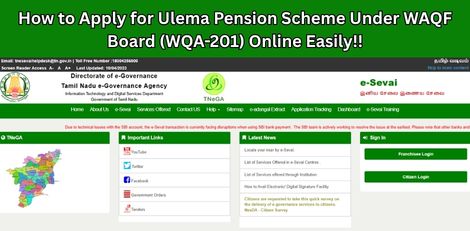
1. Access the Portal: Go to the [Tamil Nadu e-Sevai Portal](https://tnesevai.tn.gov.in)
2. Operator Login:
– Enter your login credentials (username and password)
– Enter the Captcha code displayed on screen
– Click Login
3. Access Dashboard:
– After successful login, you will be redirected to the e-SeSevai Dashboard
4. Navigate to Service:
– Click on Services from the left panel
– Department-wise service listing will appear
– Click on BC MBC and Minority Department link
– Alternatively, use Service Wise listing or Search to locate the service
5. Select Ulema Pension Scheme:
– Click on WQA – 201 Application for Ulema Pension Scheme under WAQF Board
– You will be redirected to the e-District Portal
– Click Proceed to continue
– Applicant search page will be displayed
PART B: CAN REGISTRATION (FOR NEW USERS)
6. CAN Registration (if applicant does not have CAN):
– Note: The green asterisk signifies that search options are optional mandatory
– Click on the Register CAN button
– CAN registration form will be displayed
7. Fill CAN Registration Form:
– Enter all mandatory details in the following sections:
– Applicant Detail: Name, father`s name, date of birth, gender, etc.
– Current Address: Complete residential address
– Bank Details: Bank name, branch, account number, IFSC code
– Click Register to submit the form
– On successful registration, CAN Number will be generated
– The applicant can now proceed using this CAN number
PART C: APPLICATION FOR ULEMA PENSION SCHEME
8. Search for Applicant (after CAN registration):
– Enter the CAN number OR any one of the search fields:
– Applicant Name
– Applicant Father Name
– Applicant Mobile Number
– Applicant Email Id
– Applicant Date of Birth
– Click Search button
– The corresponding record will appear in search results
9. Select Applicant Record:
– Select the record by clicking the option button against the desired record
10. Generate and Verify OTP:
– Generate OTP for verification
– Enter the OTP received on registered mobile number
– Once OTP is verified, screen will refresh
11. Proceed with Application:
– Click Proceed to continue
– Optional: CAN details can be modified by clicking Edit CAN Detail button
– Save as New option allows saving same CAN with different applicant details
12. Fill Application e-Form:
– Fill all mandatory details in the application form
– Important fields include:
– Physically Challenged status (Yes/No)
– Year of Experience for Pension Scheme
– If Yes (Physically Challenged): Minimum 10 years experience required
– If No: Minimum 20 years experience required
– Other relevant details as per schcheme requirements
– Check the Declaration box to accept terms
– Click Submit
13. Upload Supporting Documents:
– Upload Supporting Documents page will be displayed
– For each document:
– Select the document type from dropdown
– Choose the file from your computer
– Click Upload
– Upload all mandatory supporting documents as listed
14. Make Payment:
– Click Make Payment once all required documents are uploaded
– Select the Payment Type from dropdown
– Click Confirm Payment
15. Download Acknowledgement Receipt:
– On successful payment, applicant will be redirected to Acknowledgment Receipt page
– Click Print Receipt to download/print the receipt
– Save the receipt for future reference
Document Requirements:
Mandatory Supporting Documents (to be uploaded):
– Educational qualification certificates (religious education)
– Experience certificate (proof of service as Ulema/Imam)
– Age proof (birth certificate, school certificate, etc.)
– Identity proof (Aadhaar card, Voter ID, etc.)
– Address proof (ration card, utility bill, etc.)
– Bank account details (passbook copy, cancelled cheque)
– Physically challenged certificate (if applicable, from competent authority)
– Photograph (passport size, recent)
– Any other document as specified by WAQF Board
Payment Details:
– Payment Type: Select from dropdown (options as applicable)
– Payment Confirmation: Required to complete application
After Submission:
– Application Processing: Application reaches the concerned officer for further processing
– Officer Actions: Officer may Approve, Return, or Reject the application
– Notification: Applicant will be notified via SMS/Email about the decision
– Status Tracking: Can be checked using application number/CAN number
Important Notes:
– Valid Credentials: User must have valid username and password
– Mandatory Fields: Mandatory fields cannot be left blank
– CAN Number: Essential for application; register if not already available
– OTP Verification: Mobile number verification is mandatory
– Correct Entries: Make relevant and correct entries only
– Recheck Information: Recheck all entries before clicking Submit
– Document Upload: Attachch mandatory/optional documents as per requirement
– No False Entries: Do not make false entries
– Experience Criteria: 10 years for physically challenged, 20 years for others – strictly enforced
– Declaration: Must check the declaration box before submission
– Receipt Retention: Keep the acknowledgement receipt for future reference
– SMS/Email Updates: Ensure mobile number and email are correct to receive notifications
Browser Requirements:
– Browser: Google Chrome, Version 50 (or higher recommended)
– Internet Connection: Stable connection required
Assistance:
– Apply Online: https://tnesevai.tn.gov.in
– Visit: Nearest e-Sevai Centre / CSC Centre for application assistance
– Help Desk: Contact CMS Computers LTD for technical support
This guide is based on the Tamil Nadu e-District User Manual for Ulema Pension Scheme under WAQF Board. CMS Computers LTD.